

Key Takeaways
- Effective time management is about implementing scalable systems that reduce administrative friction, not micromanaging employees.
- Most businesses struggle in one of three specific areas: project management, time tracking, or scheduling.
- Avoid feature overload and choose a tool based on your current team size and technical comfort level.
- The goal of time management software is to move you, the business owner, from managing the work to leading the business.
Did you finish yesterday feeling exhausted, but with your long-term business goals still right where you left them?
If your time is getting eaten up daily by busy work, it’s time to stop pushing harder and start building better systems.
This guide will help you identify where your time is leaking and which tools will help you plug those holes…
So you can get back to the work that boosts your bottom line.
What is effective time management for small businesses?
I see a lot of business owners assume the answer is tighter control and more oversight (sometimes even to the point of micromanagement).
But on that path, you spend so much time managing the work that you have less time actually leading the business.
You need better systems, not tighter pressure.
When you have the right time management systems and tools in place, a few practical things improve:
- Clearer accountability. Everyone knows exactly what they are responsible for and when it’s due.
- Data-driven billing. Accurate time tracking ensures you aren’t leaving money on the table or over-servicing clients at the expense of your margins.
- Reduced decision fatigue. Automated scheduling and templated workflows mean you spend less mental energy on logistics.
- Improved employee morale. Teams thrive when they have clear expectations and the right tools to do their jobs without constant oversight.
- Scalable operations. Systems allow your business to handle more volume without requiring you, the owner, to work more hours.
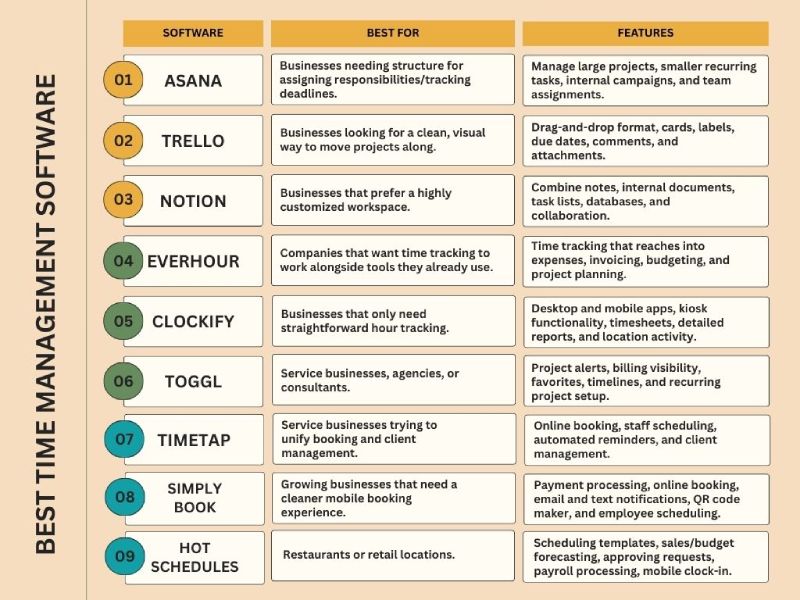
Integrating the best time management software breaks down into three separate areas: project management, time tracking, and scheduling.
What are the best project management tools for small businesses?
Feel like you’re constantly hunting for status updates in email threads or losing track of who is responsible for what? Your business has outgrown its current workflow.
These project management tools offer the best balance of power and ease of use for growing teams.
1. Asana
If projects are stalling because ‘ownership’ is vague, I recommend a structured system like Asana.
It moves the status update out of your inbox and into a centralized record, which is the only way to scale your leadership without scaling your hours.
It also integrates with a very long list of other tools, including Microsoft Teams, Slack, and Google Workspace. (Plus, it has a Chrome extension, which lets you save things from the web and turn them into tasks right away.)
For annual plans, you get the options of a free version, a $10.99 annual starter plan ($13.49 monthly), and a $24.99 annual business plan ($30.49 monthly).
2. Trello
Maybe you don’t need a full operational command center with all the bells and whistles. You’re just looking for a clean, visual way to move work from not started to done.
Trello could be the project management software for you.
Its Kanban-style boards are easy to understand quickly. And Trello’s drag-and-drop format, cards, labels, due dates, comments, and attachments make it one of the easier tools to adopt without much resistance.
This can be a very good fit if you have a smaller team, you’re a solopreneur, or you just want a better to-do system before committing to something bigger.
Trello offers:
- A free plan
- An annual $5/month standard plan (or $6 billed monthly)
- An annual $10/month premium plan ($12.50 monthly)
- A $17.50 per user per month enterprise plan (billed annually)
3. Notion
If you prefer more flexible systems, Notion may be a good fit. You can use it to create a highly customized workspace that matches how your team already thinks and works.
In Notion, you and your team can combine notes, internal documents, task lists, databases, and collaboration in one place.
It’s free to use, but there’s a trade-off: Notion can feel overwhelming at first. It gives you a lot of control. But more control means more decisions, and those decisions take time.
Still, for the right business, it can become much more than a project tool. It can serve as an internal knowledge base, operations manual, meeting hub, and planning system all at once.
What are the best small business time tracking tools?
Without accurate time tracking, you’re essentially guessing at your profitability and payroll. These tools can help move you away from guesstimates and toward a precise understanding of where your labor costs are actually going.
1. EverHour
EverHour is especially useful if your business already operates within a broader tech stack. It’s designed for companies that want time tracking to work alongside tools they already use.
EverHour also reaches into expenses, invoicing, budgeting, and project planning. So, if your business needs to track work across different software and then translate that into budgeting or invoicing decisions, EverHour has a practical appeal.
You get the options of a free plan, an $8.50 annual team plan (or $10 billed monthly), and a custom plan for larger organizations.
2. Clockify
Clockify is pretty straightforward for basic hour tracking. Employees choose a project, clock in, and track their time.
Its dashboard also gives you a better week-to-week view of where time is really being spent.
Clockify offers:
- Desktop and mobile apps
- Kiosk functionality
- Timesheets
- Time tracker
- Detailed reports
- Location activity for employees
3. Toggl
If you want time data to lead to better decisions (not just better records), Toggl is an option worth looking into.
The dashboard, project alerts, billing visibility, favorites, timelines, and recurring project setup make it geared toward businesses that want to refine how work gets done.
That makes it especially useful for service businesses, agencies, consultants, or teams doing repeatable client work.
There’s a free plan, a $9 starter plan, an $18 premium plan, and an enterprise plan.
What are the best scheduling tools for small businesses?
An appointment mix-up can lead to a lost client. A bad shift handoff can create payroll headaches, employee frustration, and service gaps.
That’s why finding the best scheduling software for your business is so important. Because client experience, staff morale, and your business’s reputation are on the line.
1. TimeTap
TimeTap is a great option if you own a service business and you’re trying to unify booking and client management.
You can use it for online booking, staff scheduling, automated reminders, and client management without having to keep everything in separate systems. You can also shape booking forms, email messages, and client profiles so the process feels more consistent with your brand and service model.
TimeTap offers a $22.45 professional plan, a $40.45 monthly business plan, and custom enterprise pricing.
2. SimplyBook
SimplyBook is helpful for growing businesses that need a cleaner mobile booking experience.
SimplyBook offers a more formal client booking structure than the manual scheduling system most small businesses start with. Its coupon tools also make it useful if you’re focused on customer retention efforts.
Pricing is free, then $11.90 per month for the annual basic plan (or $13.90 billed monthly), $24.90 for the annual standard plan ($29.90 monthly), $49.90 for the annual business plan ($59.90 monthly), and custom pricing for the enterprise plan.
3. HotSchedules
If you run a restaurant, retail location, or another business with multiple shifts and frequent coverage changes, HotSchedules relieves a lot of scheduling friction.
HotSchedule includes:
- Scheduling templates
- Mobile alerts for overtime, breaks, and related issues
- Sales and budget forecasting
- Admin tools for approving shifts or time-off requests
- Payroll processing
- Mobile clock-in
Which time management software should I be using for my business?
Start by asking yourself: where is time breaking down in my business right now?
If the breakdown is around task ownership, deadlines, and collaboration, start with project management. If it’s payroll or billable hours, focus on time tracking.
Or, if appointments and staffing are causing the stress, scheduling software will likely give you the fastest operational relief.
A few practical pairings might look like this:
- If you run a growing service business, the best time management software for you might be Asana and TimeTap
- If you own a small creative or consulting firm, you might do well with Trello and Toggl
- If you operate a retail business or restaurant, you might see productivity gains from Clockify and HotSchedules
- If your business is highly customized and process-minded, you might prefer Notion and EverHour
Final thoughts
The reason I care about you using the best time management software is simple: clean data at the source is the only way we can accurately plan for your taxes and protect your margins.
If you’re struggling to see where your labor costs are actually going, let’s look at your workflow.
We can help you identify a system that ensures your financial records are audit-ready and that your profit-and-loss statements actually reflect reality.
FAQs
“How do I implement a new time management tool into my business?”
If the tool feels like extra work instead of a work-saver, your team will resist it. Start by choosing a tool with a clean mobile interface, like Trello or Clockify, and run a one-week pilot. Show your team how it reduces the number of status update emails they have to answer, and they’ll probably embrace it.
“Is it worth paying for a premium plan for small business time management software?”
Free plans are great for testing the waters or for solopreneurs. However, once you have more than three employees, you usually need the paid features. Like automated reminders, advanced reporting, and payroll integrations.
“Should I use separate apps for time tracking and scheduling?”
In 2026, all-in-one tools like Notion or Connecteam are powerful, but they have a steeper learning curve. If your business has one specific pain point, like messy client bookings, start with a dedicated tool for that. You can always use integrations like Zapier later.
“Does time tracking hurt employee trust?”
Not if you frame it carefully. Explain that accurate data helps you balance workloads fairly, prevents burnout, and ensures the business stays profitable so everyone keeps their jobs.
“Can time management tools help with payroll and tax compliance?”
Most modern time trackers sync directly with payroll software like QuickBooks or Gusto. This eliminates manual entry errors, which are the leading cause of payroll headaches and tax filing red flags.